


Complete Installation Guide for Prama STQC CCTV Cameras: Setup, Compliance & Best Practices
- SKN IOT TECHNOLOGY IT DEPT

- Dec 20, 2025
- 3 min read
Installing a reliable CCTV system is essential for securing homes, offices, and public spaces. Prama STQC CCTV cameras stand out as government-approved devices that meet stringent quality and security standards. This guide walks you through everything you need to know about installing, configuring, and using Prama STQC CCTV cameras to ensure compliance and optimal performance.

Understanding Prama STQC CCTV Cameras and Their Importance
Prama STQC CCTV cameras are certified by the Standardisation Testing and Quality Certification (STQC) Directorate, a government body that ensures electronic products meet national security and quality benchmarks. These cameras are designed to provide:
High-resolution video capture for clear identification
Secure data transmission to prevent tampering or hacking
Durability for indoor and outdoor use under various weather conditions
Compliance with government regulations for surveillance equipment
Using STQC-certified cameras guarantees that your surveillance system adheres to legal standards, which is crucial for sensitive environments such as government offices, banks, and critical infrastructure.
Preparing for Installation
Before starting the installation, gather the necessary tools and materials:
Prama STQC CCTV camera kit (camera, mounting hardware, power adapter)
DVR or NVR system compatible with the camera
Ethernet cables or coaxial cables (depending on camera type)
Power supply cables
Drill and screws for mounting
Monitor or smartphone for configuration
Ladder or scaffolding for high placements
Site Survey and Camera Placement
Choosing the right location for each camera is vital. Consider these factors:
Field of view: Ensure the camera covers the desired area without obstructions.
Height: Mount cameras high enough to avoid vandalism but low enough for clear images.
Lighting: Avoid direct sunlight or glare; use cameras with infrared for night vision.
Power source: Confirm proximity to power outlets or plan for Power over Ethernet (PoE).
Plan your camera layout on a floor plan to visualize coverage and cable routing.
Step-by-Step Installation Process
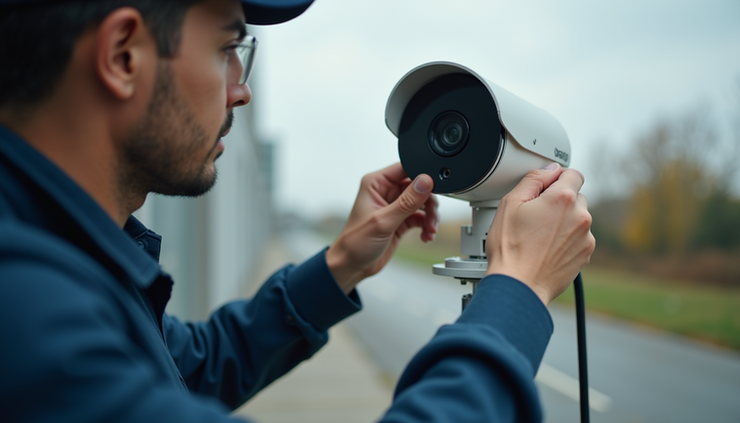
1. Mounting the Camera
Mark the drill points using the camera’s mounting plate.
Drill holes and insert anchors if needed.
Secure the camera bracket firmly with screws.
Attach the camera to the bracket and adjust the angle.
2. Connecting the Camera
For analog cameras, connect the coaxial cable from the camera to the DVR.
For IP cameras, connect the Ethernet cable to the camera and switch or router.
Connect the power adapter to the camera or use PoE for power and data over one cable.
3. Configuring the Camera
Power on the camera and DVR/NVR system.
Access the camera interface via the connected monitor or web browser.
Set the IP address if required (for IP cameras).
Adjust video settings such as resolution, frame rate, and motion detection zones.
Configure recording schedules and alerts.
4. Testing and Final Adjustments
Check live video feeds for clarity and coverage.
Test night vision and motion detection.
Secure all cables and tidy the installation area.
Document camera locations and settings for future reference.
Compliance and Best Practices
Ensuring Regulatory Compliance
Prama STQC CCTV cameras comply with government standards, but installers must also follow these rules:
Obtain necessary permissions for surveillance in public or shared spaces.
Inform occupants or visitors about CCTV usage through clear signage.
Store recorded footage securely and limit access to authorized personnel.
Retain footage only as long as legally required.
Maintenance Tips for Long-Term Performance
Clean camera lenses regularly to avoid blurry images.
Inspect mounts and cables for wear or damage every six months.
Update firmware to patch security vulnerabilities.
Test system functionality periodically to catch issues early.
Using Prama STQC CCTV Cameras Effectively
Integrating with Security Systems
Prama STQC cameras work well with various DVR/NVR systems and can be integrated into broader security setups including alarms and access control.
Remote Monitoring
Use mobile apps or web portals provided by the camera manufacturer to monitor live feeds remotely. Ensure secure login credentials to protect privacy.
Data Management
Set up automatic backups and use encrypted storage to protect video data. Regularly review footage to identify security gaps or incidents.

Final Thoughts
Installing Prama STQC CCTV cameras offers a reliable and compliant way to enhance security. Following this guide ensures your system works efficiently and meets government standards. Take time to plan your installation carefully, maintain your equipment, and use the cameras to their full potential. Secure your property with confidence by choosing certified technology and best practices.


Comments